
前言:本文是结合我自己阅读代码的心得总结而来,同时会忽略很多细节,只能作为阅读源码时的参考。如有错误,欢迎指正.
Spice 简介
Spice 是一个开源的云计算解决方案,使客户端能显示远程虚拟主机的操作界面并且使用其设备,如键盘,鼠标,声音等。Spice 给用户提供了一种如同操作本地机器一样的体验,同时尽可能把密集的 CPU 和 GPU 任务在客户端上执行。Spice 能在局域网和互联网间使用,而不减少用户体验。
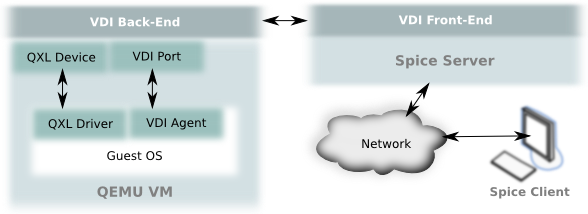
Spice 的基本组成包括:
- Spice 协议
- Spice 服务器
- Spice 客户端
Spice 的相关组件包括:
- QXL 设备
- QXL 驱动
其中,Spice 服务器基于 libspice(一个虚拟设备接口可插拔库)。VDI 提供了一个通过软件组件来发布虚拟设备接口的标准方式,使得软件组件能够与虚拟设备交互。
- 服务器使用 Spice 协议与客户端交互。
- 服务器通过 VDI 接口与 VDI 主机程序(如 QEMU)交互。
也就是说 spice 服务器处于主机与客户端中间,是整个 Spice 的核心所在。下面我们开始从代码层面分析 spice 服务器 更多资料查看本人翻译的 spice 新手文档Spice 入门,以及官方网站
Spice server
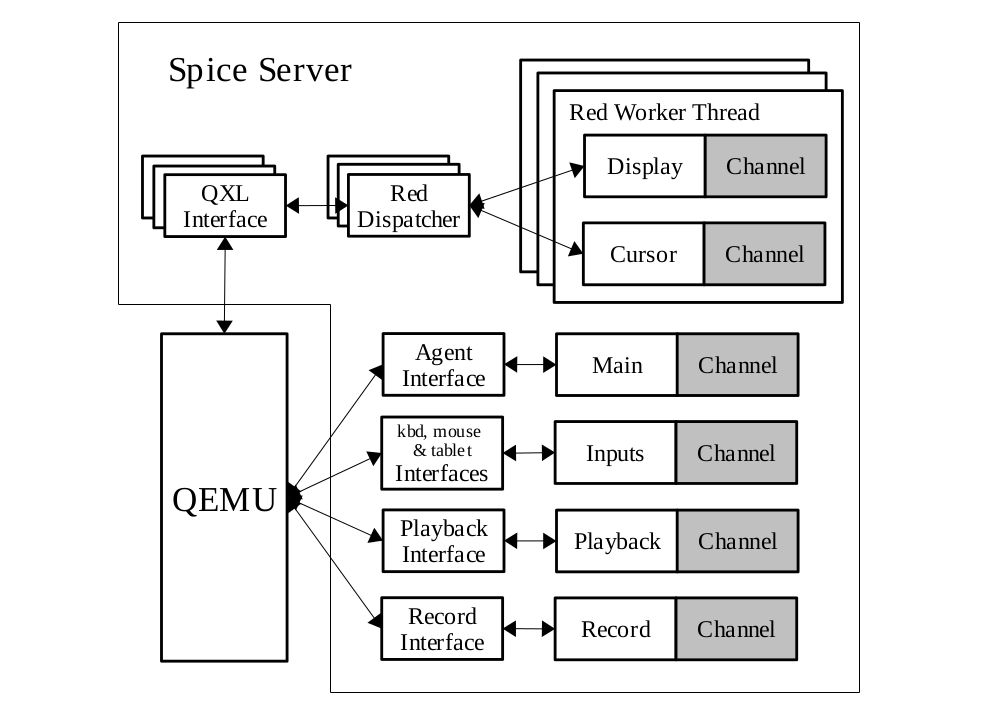 图 1 是 spice 服务器的核心架构,贯穿整个源码的组织结构。
值得一提的是,spice server 是作为一个库提供给 qemu 使用的,编译出来就是 libspice,所以代码中没有 main 函数。
下面我们先了解一个 server 源码中使用到的一些核心概念,在看源码之前推荐大家先看一遍Spice 入门,否则理解代码中的某些核心概念会很吃力。
图 1 是 spice 服务器的核心架构,贯穿整个源码的组织结构。
值得一提的是,spice server 是作为一个库提供给 qemu 使用的,编译出来就是 libspice,所以代码中没有 main 函数。
下面我们先了解一个 server 源码中使用到的一些核心概念,在看源码之前推荐大家先看一遍Spice 入门,否则理解代码中的某些核心概念会很吃力。
部分宏定义
- SPICE_GNUC_DEPRECATED,其定义是
#define SPICE_GNUC_DEPRECATED __attribute__((__deprecated__))表示该函数以及被弃用,在编译时会给出警告 - SPICE_GNUC_VISIBLE,其定义是
#define SPICE_GNUC_VISIBLE __attribute__ ((visibility ("default")))用于控制符号的可见性,设置为对外可见.spice 作为动态链接库给 qemu 使用,默认隐藏函数对外部的可见性,即外部文件不能调用库里面的函数,有这个声明的函数可以被外部文件调用,即为公共函数。
公共函数
Server 的公共函数主要在两个头文件中:
- spice.h:与 SpiceServer 结构体相关的函数,是 qemu 调用 spice 的主要函数
- red_dispatcher.h:与 QXL 设备相关的函数
对 server 的分析,主要围绕这三个公共函数:
- spice_server_init:负责初始化 spice_server
- spice_server_add_interface:给 server 注册 VDI 接口
- spice_server_add_client:处理 qemu 接收到的客户端连接消息
VDI 接口
从图 1 中可以看到,VDI 接口是 spice server 离 qemu 最近的一层,qemu 主要是通过 VDI 接口来与 spice 交互的。 VDI 接口的定义在 spice.h 中,结构体内部的函数指针实现都在 qemu 的源码里面 (ui/spice-core.c)
- SpiceCoreInterface:核心接口,用于创建,添加,取消定时和监听事件
    SpiceTimer *(*timer_add)(SpiceTimerFunc func, void *opaque);
    void (*timer_start)(SpiceTimer *timer, uint32_t ms);
    void (*timer_cancel)(SpiceTimer *timer);
    void (*timer_remove)(SpiceTimer *timer);
    SpiceWatch *(*watch_add)(int fd, int event_mask, SpiceWatchFunc func, void *opaque);
    void (*watch_update_mask)(SpiceWatch *watch, int event_mask);
    void (*watch_remove)(SpiceWatch *watch);
void (*channel_event)(int event, SpiceChannelEventInfo *info);- QXLInterface:QXL 设备接口
    void (*attache_worker)(QXLInstance *qin, QXLWorker *qxl_worker);
    void (*set_compression_level)(QXLInstance *qin, int level);
    void (*set_mm_time)(QXLInstance *qin, uint32_t mm_time);
    void (*get_init_info)(QXLInstance *qin, QXLDevInitInfo *info);
    int (*get_command)(QXLInstance *qin, struct QXLCommandExt *cmd);
    int (*req_cmd_notification)(QXLInstance *qin);
    void (*release_resource)(QXLInstance *qin, struct QXLReleaseInfoExt release_info);
    int (*get_cursor_command)(QXLInstance *qin, struct QXLCommandExt *cmd);
    int (*req_cursor_notification)(QXLInstance *qin);
    void (*notify_update)(QXLInstance *qin, uint32_t update_id);
    int (*flush_resources)(QXLInstance *qin);
    void (*async_complete)(QXLInstance *qin, uint64_t cookie);
    void (*update_area_complete)(QXLInstance *qin, uint32_t surface_id,struct QXLRect *updated_rects,uint32_t num_updated_rects);
    void (*set_client_capabilities)(QXLInstance *qin,uint8_t client_present,uint8_t caps[58]);
    /* returns 1 if the interface is supported, 0 otherwise.
     * if monitors_config is NULL nothing is done except reporting the
     * return code. */
int (*client_monitors_config)(QXLInstance *qin,VDAgentMonitorsConfig *monitors_config);- SpiceCharDeviceInterface:字符型设备接口
    void (*state)(SpiceCharDeviceInstance *sin, int connected);
    int (*write)(SpiceCharDeviceInstance *sin, const uint8_t *buf, int len);
    int (*read)(SpiceCharDeviceInstance *sin, uint8_t *buf, int len);
void (*event)(SpiceCharDeviceInstance *sin, uint8_t event);- SpiceKbdInterface:键盘接口
    void (*push_scan_freg)(SpiceKbdInstance *sin, uint8_t frag);
uint8_t (*get_leds)(SpiceKbdInstance *sin);- SpiceMigrateInterface:迁移接口
    void (*migrate_connect_complete)(SpiceMigrateInstance *sin);
void (*migrate_end_complete)(SpiceMigrateInstance *sin);- SpiceMouseInterface:鼠标接口
    void (*motion)(SpiceMouseInstance *sin, int dx, int dy, int dz,uint32_t buttons_state);
void (*buttons)(SpiceMouseInstance *sin, uint32_t buttons_state);- SpiceTabletInterface:触摸板接口
    void (*set_logical_size)(SpiceTabletInstance* tablet, int width, int height);
    void (*position)(SpiceTabletInstance* tablet, int x, int y, uint32_t buttons_state);
    void (*wheel)(SpiceTabletInstance* tablet, int wheel_moution, uint32_t buttons_state);
void (*buttons)(SpiceTabletInstance* tablet, uint32_t buttons_state);- SpicePlaybackInterface:声音接口
- SpiceRecordInterface:录音接口
Channel
从图 1 可以看到,VDI 接口之后即是 Channel(QXLInterface 比较特殊,这个后面再说). Channel 的主要作用是使用对应的 TCP 连接传输消息给客户端,保证其传输的可靠性,其本质是通道,不同的 Channel 传输不同的消息。
spice 中主要有六种 Channel:
- MainChannel:与客户端连接的建立和断开有关
- InputsChannel:跟鼠标,键盘,触摸板的输入有关
- DisplayChannel:跟图像传输有关
- CursorChannel:跟鼠标指针的显示有关
- PlaybackChannel:跟播放宿机的声音有关
- RecordChannel:跟录制客户端的声音有关
这六种 Channel 并不是平行的关系,虽然都继承与 RedChannel,但是在实现以及逻辑上的作用有很大不同,大致可以分成三类。
- Main 和 Input 通道被相应的处理函数控制 (reds.c)
- Display 和 Cursor 通道被每个 display 工作线程使用 (red_worker.c)
- Playback 和 Record 通道有它们各自的处理程序 (snd_worker.c)
六种 Channel 中只有 DisplayChannel 和 CursorChannel 是单独在工作线程工作的,其他都是在 qemu 线程工作。
Dispatcher
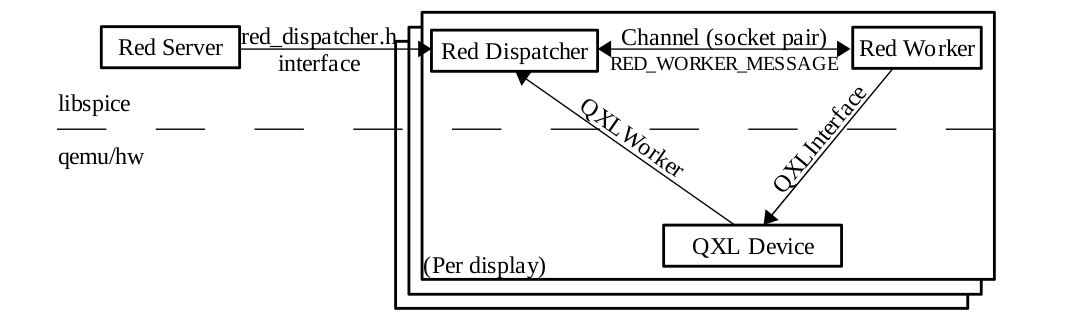 前面提到 Channel 负责传输消息,而 Dispatcher 则负责处理消息,并且调度 Channel.
Dispatcher 使用 socketpair 来与外界交互,例如监听事件,传输结果等。
这里存在两种 Dispatcher
前面提到 Channel 负责传输消息,而 Dispatcher 则负责处理消息,并且调度 Channel.
Dispatcher 使用 socketpair 来与外界交互,例如监听事件,传输结果等。
这里存在两种 Dispatcher
- MainDispatcher:在 qemu 线程中监听 socket 事件,处理客户端连接的初始化,建立和断开等,跟 MainChannel 相关
- RedDispatcher:在 worker 线程中监听 socket 事件,处理 QXL 设备有关的消息,跟 DisplayChannel,CursorChannel 相关,图 3 描述的就是 RedDispatcher 的工作流程。在图 1 我们看到 QXLInterface 与其他接口不一样,与 Channel 的联系中间多了一个 RedDispatcher,它们在单独的 Worker 线程中工作,提供了 QEMU 与接收的图像命令处理和渲染过程的独立性
RedWorker
RedWorker 可以说是 server 的核心,80% 代码跟它有关,毕竟它负责图像渲染和传输,这是 spice 最难最复杂的部分,涉及图像的压缩,渲染,局部刷新等核心技术。 RedWorker 在单独线程上工作,通过 QXLInterface 与 QEMU 的 QXL 设备直接交互,同时控制 DisplayChannel,CursorChannel,并且拥有自己的 poll 事件驱动核心。而其他的 Channel 都依赖于 QEMU 线程。
总结
- Spice server 作为一个库给 QEMU 调用,用于支持 Spice 协议。
- server 通过使用 VDI 接口与 QEMU 交互
- server 通过使用 Channel 与客户端交互
- Dispatcher 用于处理消息
- Channel 用于传输消息
- 图像在 RedWorker 线程中处理
以上是我分析的 server 源代码的核心概念,为了方便理解,描述并不全面。其中关于迁移,声音,录音等功能并没有看过,我主要关注 server 的工作原理,在了解它工作流程之后,就好比有了一张地图,剩下的就是一个个去探险了。 当然了,没有代码的分析就是耍流氓。这篇就当是开胃菜,之后,我会结合代码,分析 server 的启动流程以及工作流程。先挖个坑。